
Threat Detection
Threat Detection Policies allow security teams to define what threats ARMO detects, prioritizes, and responds to across their application and cloud environments.
Instead of managing detections as isolated rules or alerts, policies let you define detection behavior in a structured way: which environments to focus on, which conditions should apply, which rules should run, and how ARMO should respond when a threat is detected.
Security teams can use threat detection policies to:
-
Apply consistent detection coverage across clusters, workloads, cloud accounts, and regions.
-
Focus detection on the environments and assets that matter most.
-
Reduce noise and alert fatigue by narrowing policies to specific scopes, criteria, or rule sets.
-
Route threat notifications to the right teams and tools.
-
Use automated response actions, where supported, to help contain active threats faster.
View and manage policies
The Threat Detection Policies page lists the threat detection policies defined in your environment, where you can review existing policies, create new policies, edit policy configuration, and enable or disable policies.
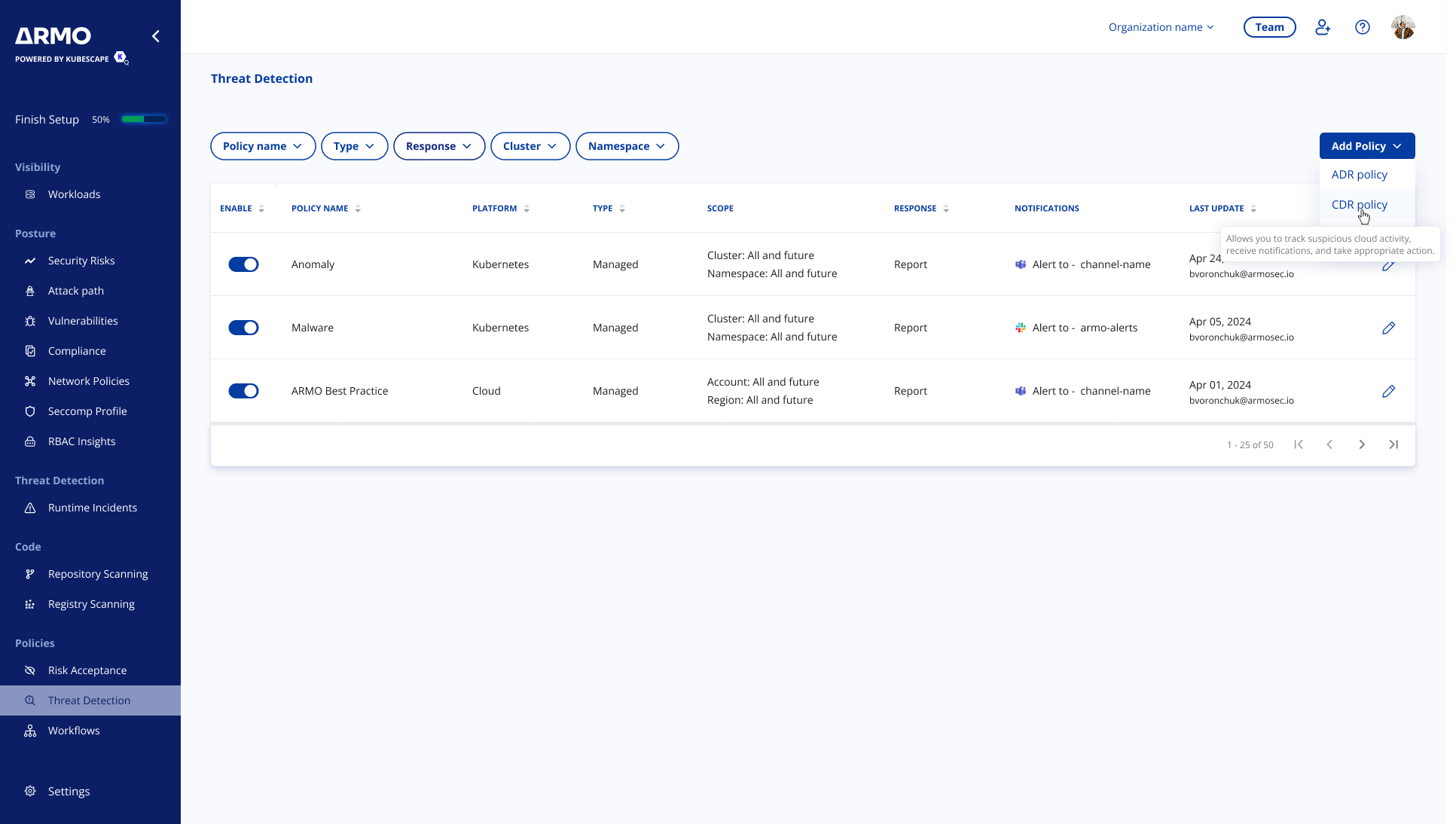
Use the filters above the table to find policies by policy name, type, response, cluster, or namespace.
The policies table includes the following columns:
| Column | Description |
|---|---|
| Enable | Shows whether the policy is active. Disable a policy to stop it from applying to new detections. |
| Policy Name | The name of the policy. |
| Type | Indicates whether the policy is managed by ARMO or custom-created by a user. |
| Scope | Shows the environments, resources, or assets the policy applies to, such as clusters, namespaces, cloud accounts, or regions. |
| Response | Shows how detections are handled, where supported. |
| Last update | Shows when the policy was last updated and by whom. |
Create, edit, and delete policies,
To create a new policy, click Add Policy and select either ADR policy or CDR policy.
To edit an existing policy, click the edit icon at the end of the policy row.
Disabling a policy stops it from applying to new detections.
To delete a policy, click the edit icon (pencil) at the end of the policy row, then click the trash icon at the top of the policy panel. Deleting a policy removes it permanently and cannot be undone.
Disabling and deleting both apply going forward. Incidents that were already reported remain available in the main dashboard for review and tracking.
Policy types
ARMO Platform has two types of policies: Application Detection & Response (ADR) and Cloud Detection & Response (CDR):
ADR policies
ADR policies monitor runtime activity across Kubernetes workloads, hosts, VMs, and containers to detect suspicious behavior in the application layer, and can apply supported response actions.
CDR policies
CDR policies monitor cloud accounts, regions, and infrastructure activity to detect threats, suspicious changes, and security events across your cloud environments.
ADR vs. CDR policy components
| Capability | ADR policies | CDR policies |
|---|---|---|
| Primary environment | Application and runtime environments | Cloud infrastructure |
| Typical scope | Clusters, namespaces, workloads, and labels | Cloud providers, accounts, and regions |
| Rules | Application and runtime threat rules | Cloud infrastructure threat rules |
| Criteria | Supported | Not supported |
| Runtime response actions | Supported | Not supported |
| Notifications | Supported | Supported |
Managed vs. custom policies
Managed policies are predefined out of the box policies created and maintained by ARMO. The underlying detection logic is managed by ARMO and updated as needed, ensuring consistent and up-to-date security coverage.
Custom policies are user-defined policies that enable organizations to tailor the scope, criteria, detection logic, actions, and notifications to their specific needs. They provide greater control over detection behavior, allowing security policies to align with specific business, operational, and security requirements.
Updated 2 months ago