
Runtime Incidents
Overview
In certain cases, you may want to suppress specific runtime incidents, especially when they involve
known tools, benign processes, or trusted behaviors that are common in your environment.
The Risk Acceptance feature allows you to suppress such incidents by creating targeted suppression rules from existing incidents.
Risk acceptance rules are defined using a combination of scope and advanced scope entities:
- Scope determines where the rule applies.
- Advanced scope entities determine which runtime behavior must match.
This allows you to control both how broadly the rule is applied and how precisely incidents are matched.
Runtime incident risk acceptance supports both ADR and CDR incidents. The available scope fields and advanced scope entities may differ depending on the incident type.
When to Use This
Use runtime incident risk acceptance when an incident is expected, understood, and does not require remediation in the selected context.
Common use cases include:
- Known and approved activity that repeatedly triggers the same incident
- Expected behavior from trusted automation, tools, or users
- Activity that is acceptable only for a specific account, region, resource, workload, or runtime context
- Temporary acceptance while an investigation or remediation is in progress
Risk acceptance should be used for incidents that have already been reviewed and determined to be acceptable in the relevant scope.
How Risk Acceptance Works
When you accept risk for a runtime incident, ARMO creates a suppression rule from that incident.
The rule is based on the selected:
- Scope: where the rule applies
- Advanced scope entities: which incident attributes must match
- Optional settings: such as expiration date and reason
Future runtime incidents that match the rule are suppressed and are not generated or shown in the platform.
The available scope fields and advanced scope entities depend on the incident type. ADR and CDR incidents may use different scope models and different advanced scope entities.
Scope of Accepted Risk
Risk acceptance scope defines where the suppression rule applies.
The available scope fields depend on the incident type. ADR incidents use a hierarchical runtime scope model, while CDR incidents use a cloud-resource scope model.
The selected scope values determine where the risk acceptance rule applies. For ADR incidents, scope is built from hierarchical Type-Value pairs. For CDR incidents, scope is configured using Account, Region, and Resource fields.
The following tables describe the available scope fields and how each field affects risk acceptance behavior.
ADR Scope
| Type | Value Description | Behavior |
|---|---|---|
| Provider | Cloud provider | Highest-level scope. Applies the rule within the selected cloud provider context. |
| Account | Cloud account | Applies the rule to matching incidents in the selected account. |
| Region | Cloud region | Applies the rule to matching incidents in the selected region. |
| Host | Host name | Applies the rule to matching incidents on the selected host. |
| Cluster | Cluster name | Applies the rule to matching incidents in the selected Kubernetes cluster. |
| Namespace | Namespace name | Applies the rule to matching incidents in the selected namespace. |
| Workload | Workload name | Most specific Kubernetes runtime scope. Applies the rule to matching incidents for the selected workload. |
CDR Scope
| Type | Value Description | Behavior |
|---|---|---|
| Account | Cloud account | Applies the rule to matching incidents in the selected account. |
| Region | Cloud region | Applies the rule to matching incidents in the selected region. |
| Resource | Cloud resource | Applies the rule to matching incidents for the selected cloud resource. |
Scope Configuration
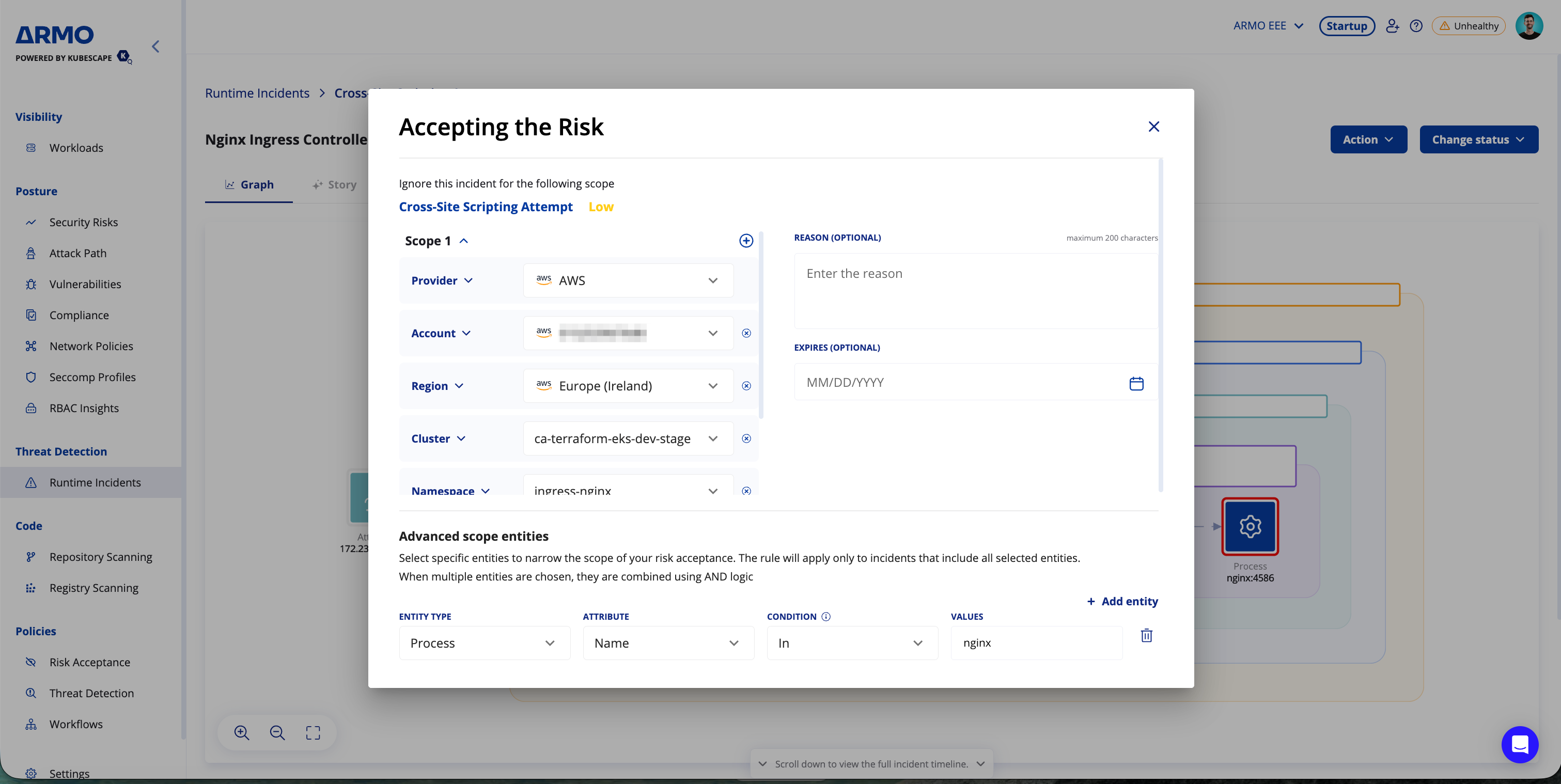
When you open the Accept Risk window, ARMO automatically generates a default scope from the selected incident. By default, this helps limit the risk acceptance rule to the affected context.
You can review and adjust the generated scope before saving the rule.
ADR Scope Configuration
For ADR incidents, each scope is built from one or more Type–Value pairs based on the context of the selected incident.
ADR scopes follow the incident context and may use different hierarchy paths:
- Cloud runtime: Provider → Account → Region → Host
- Kubernetes runtime: Provider → Account → Region → Cluster → Namespace → Workload
You can broaden the scope by removing lower-level types.
Scope behavior: To broaden an ADR risk acceptance rule, remove lower-level scope values. For example, removing Workload applies the rule to matching incidents in the selected namespace, regardless of workload. Removing Namespace applies the rule to matching incidents in the selected cluster.
To apply risk acceptance to multiple scope paths, create additional scopes. Each scope represents a separate path, and multiple scopes are evaluated using OR logic.
CDR Scope Configuration
For CDR incidents, the scope is configured using cloud-resource fields from the selected incident:
Account → Region → Resource
The default CDR scope is generated from the affected cloud account, region, and resource.
Some CDR scope fields may support Select all and future, allowing the rule to apply to current and future matching values for that field.
Advanced Scope Entities
Advanced scope entities define which incident attributes must match for the suppression rule to apply.
They add fine-grained precision to risk acceptance by suppressing only incidents that match the specific runtime behavior you have reviewed, while keeping unrelated incidents visible.
Entity conditions are applied in addition to the defined scope, allowing you to control both where the rule applies and which runtime behavior it matches.
The available and populated advanced scope entities depend on the incident type and the data available for that incident.
ADR Advanced Scope Entities
The following advanced scope entities are available for ADR incidents.
| Entity Type | Attributes |
|---|---|
| File | Name, directory |
| Process | Name, command line |
| DNS | Domain name |
| HTTP | Domain name, user agent, endpoint, method, detected payload |
| Network Endpoint | Destination IP, destination port, protocol |
CDR Advanced Scope Entities
The following advanced scope entities are available for CDR incidents.
| Entity Type | Attributes |
|---|---|
| Event | Name, source |
| User identity | User name, type, ARN, principal ID, access key ID |
| Source information | Source IP address, user agent |
| Cloud API | Service name, resource name, API call, user |
For each advanced scope entity, the available conditions are:
| Condition | Description |
|---|---|
| In | Matches the exact selected value. |
| Contains | Matches values that contain the selected text. |
When multiple advanced scope entities are selected, they are combined using AND logic. The rule applies only to incidents that match all selected entities.
Matching Logic
Risk acceptance rules are matched using the selected scope and advanced scope entities.
- OR across scopes: If multiple scopes are defined, the rule applies when an incident matches any of them.
- AND across entity types: All specified entities must match for the rule to apply.
- Exact match by default: The
Incondition matches exact values. Values are separated by commas. To include a comma as part of a value, escape it with\. - Partial matching: The
Containscondition matches values that contain the selected text. - Matches are case-sensitive.
Creating Suppression Rules
To accept risk for a runtime incident, open the incident, click the Action menu, and select Accept risk.
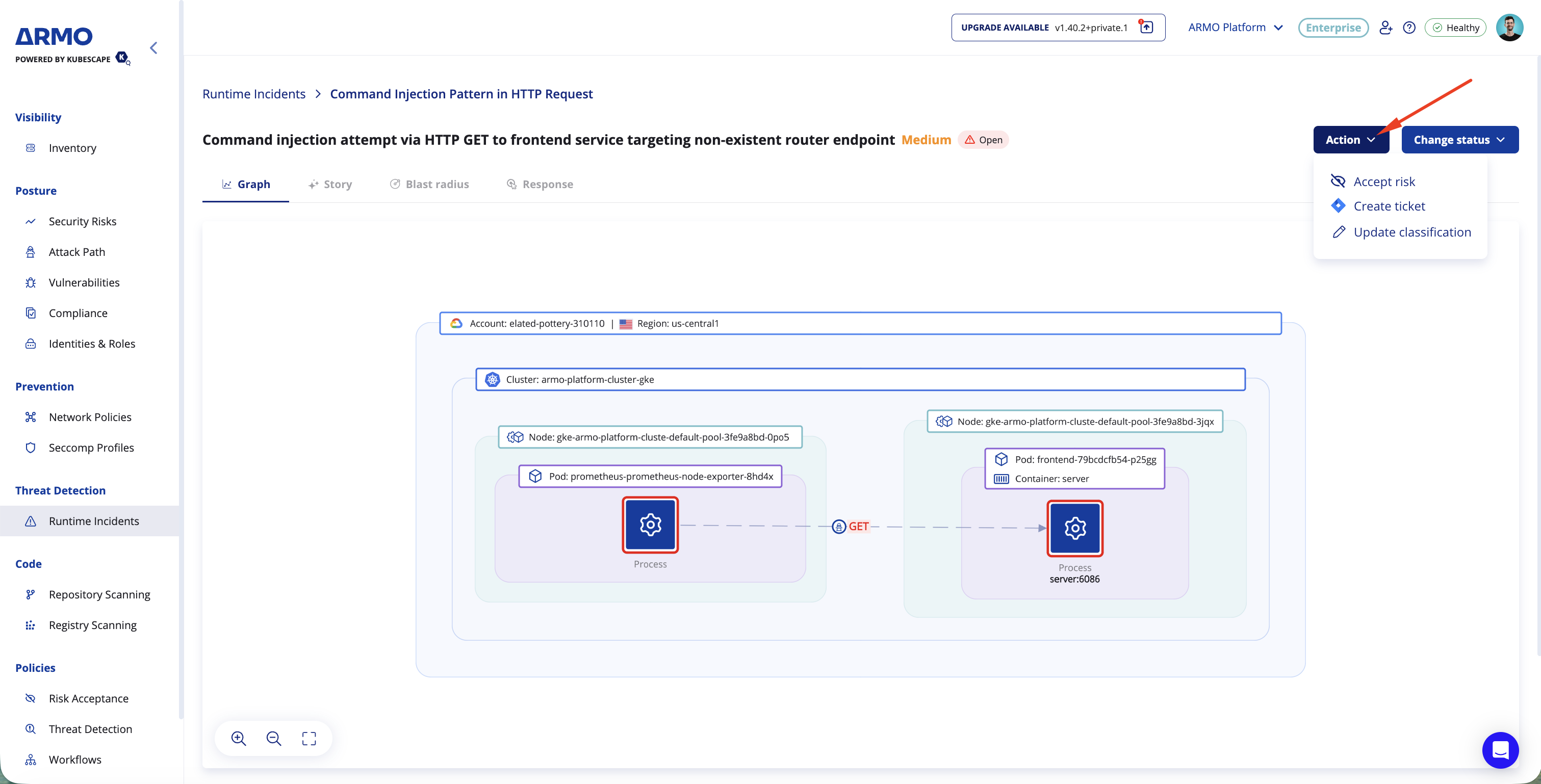

Suppression rules are created directly from a specific incident. Relevant scope and advanced scope entity details are automatically populated in the rule creation form based on the incident you are accepting.
Before saving the rule, you can review, edit, remove, or add scope values, advanced scope entities, and entity values.
When creating a suppression rule:
- Auto-prefill from incident: The default scope and relevant advanced scope entities are pulled directly from the incident.
- Editable rule configuration: You can change, remove, or add scope values, advanced scope entities, and entity values.
- Affected incidents: You can see how many existing incidents would be affected by the current rule configuration before saving. If the number is higher than expected, narrow the scope or remove broad advanced scope entity values.
- Immediate activation: Suppression rules are active immediately after they are created.
- Revocable: You can revoke suppression rules at any time from the Risk Acceptance Management section.
Optional Settings
You can configure the following optional settings when creating a risk acceptance rule:
- Reason: Add context explaining why the incident is being accepted.
- Expires: Define when the risk acceptance will automatically expire.
Note:When you create a risk acceptance rule, existing incidents that match the rule are marked as resolved. They remain stored in the system and can still be viewed.
Future incidents that match the rule are not generated, stored, resolved, or visible in the platform. This helps reduce noise without losing visibility into past activity.
Examples
ADR Example: IMDS Token Theft Detected
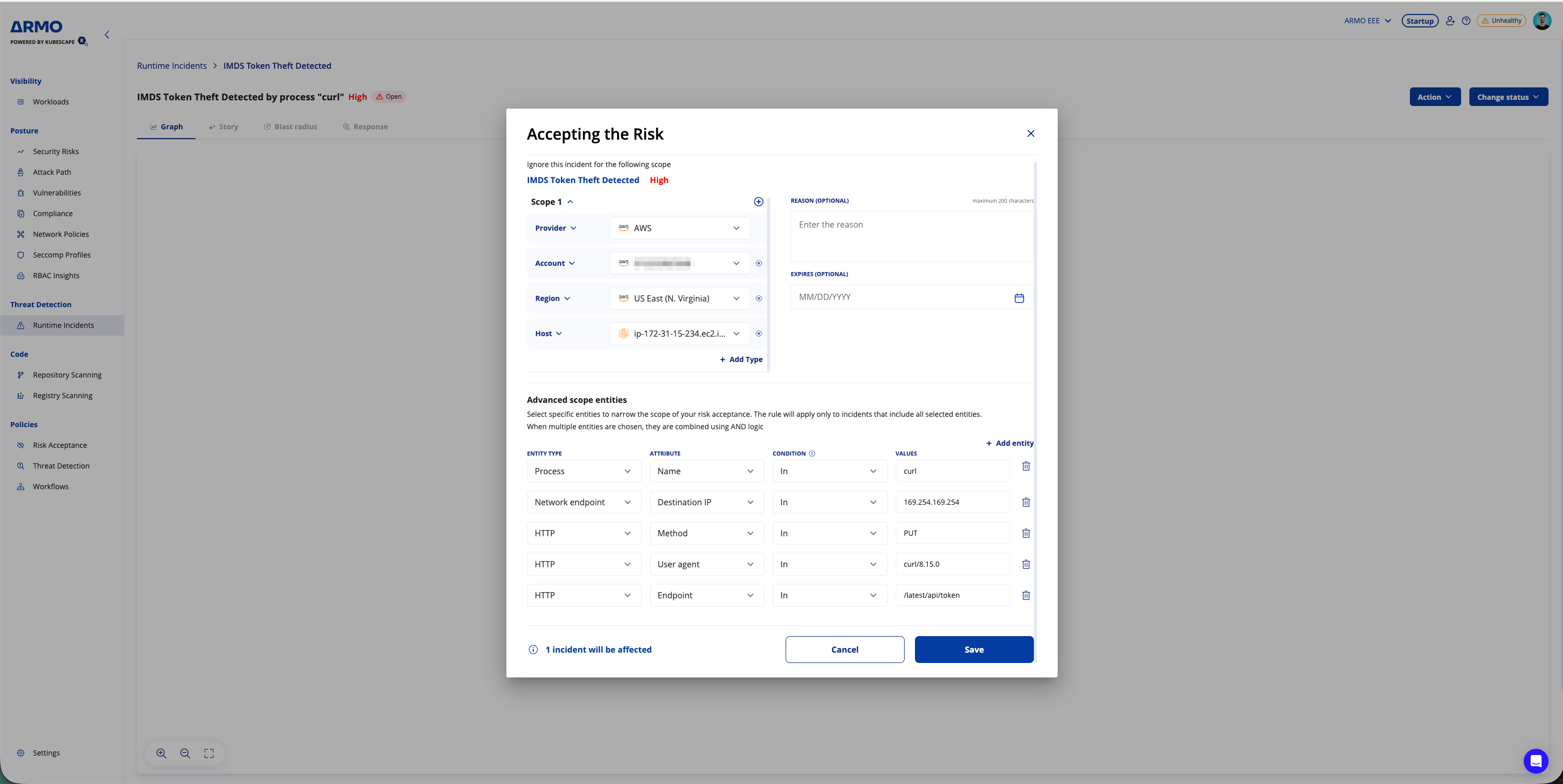
When accepting risk for an IMDS Token Theft Detected incident, the default scope, Scope 1, is automatically generated from the selected incident context.
In this example, Scope 1 includes:
- Provider: The cloud provider
- Account: The affected cloud account
- Region: The affected cloud region
- Host: The affected host
The incident details are also automatically populated as advanced scope entities.
Advanced scope entities
-
Process
- Name: The process name associated with the activity
-
Network Endpoint
- Destination IP: The destination IP address associated with the activity
-
HTTP
- Method: The HTTP method associated with the activity
- User agent: The user agent associated with the activity
- Endpoint: The HTTP endpoint associated with the activity
Only future incidents matching this scope and all selected advanced scope entity conditions will be suppressed.
CDR Example: AWS KMS Key Deletion
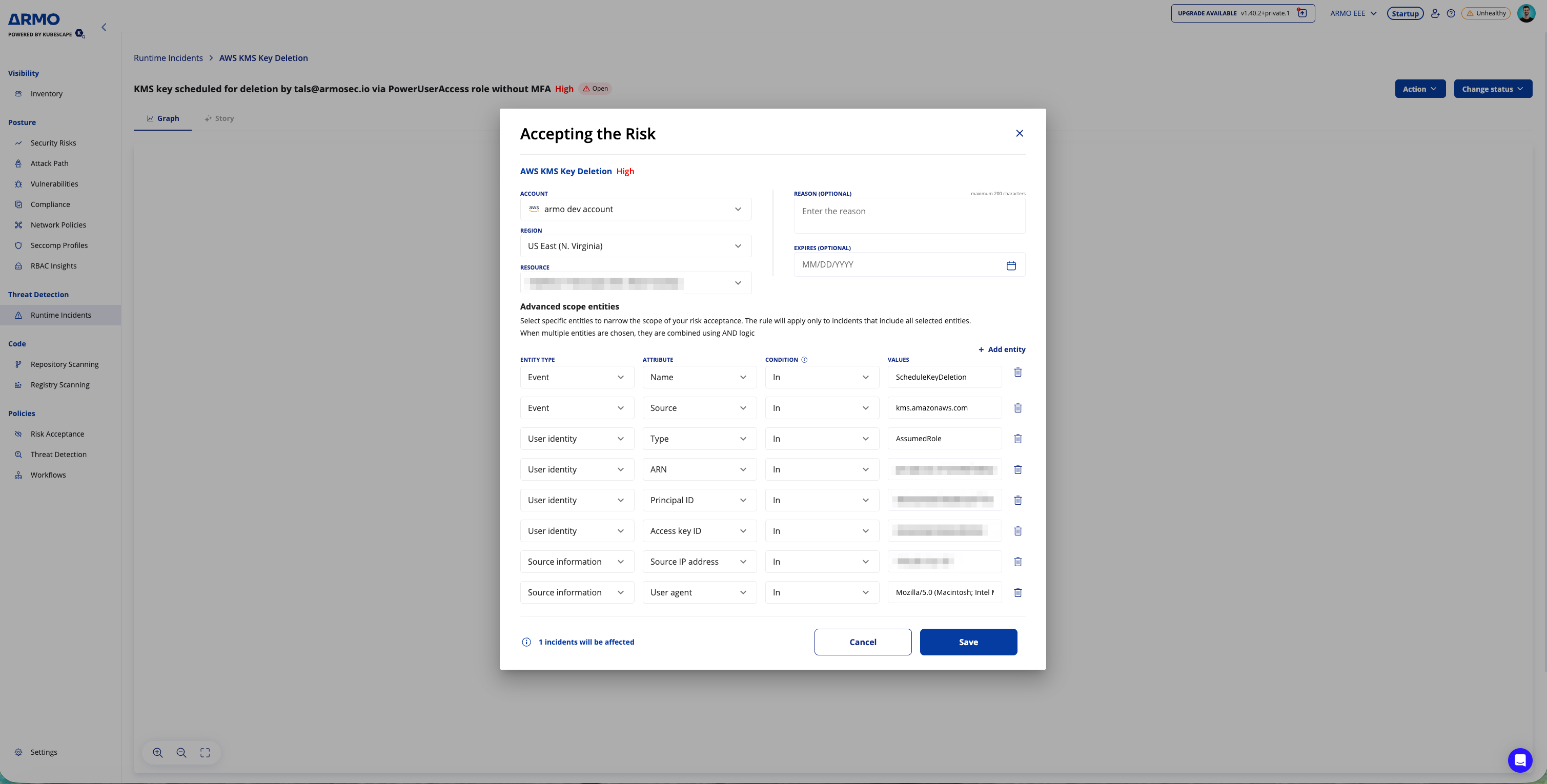
When accepting risk for an AWS KMS Key Deletion incident, the default scope is automatically generated from the selected cloud incident context.
In this example, the scope includes:
- Account: The affected AWS account
- Region: The affected AWS region
- Resource: The affected KMS key resource
The incident details are also automatically populated as advanced scope entities.
Advanced scope entities
-
Event
- Name:
ScheduleKeyDeletion - Source:
kms.amazonaws.com
- Name:
-
User identity
- Type:
AssumedRole - ARN: The AWS role ARN associated with the activity
- Principal ID: The principal ID associated with the activity
- Access key ID: The access key ID associated with the activity
- Type:
-
Source information
- Source IP address: The source IP address associated with the activity
- User agent: The user agent associated with the activity
The rule suppresses future incidents only when they match this scope and all selected advanced scope entity conditions.
Managing Accepted Risks
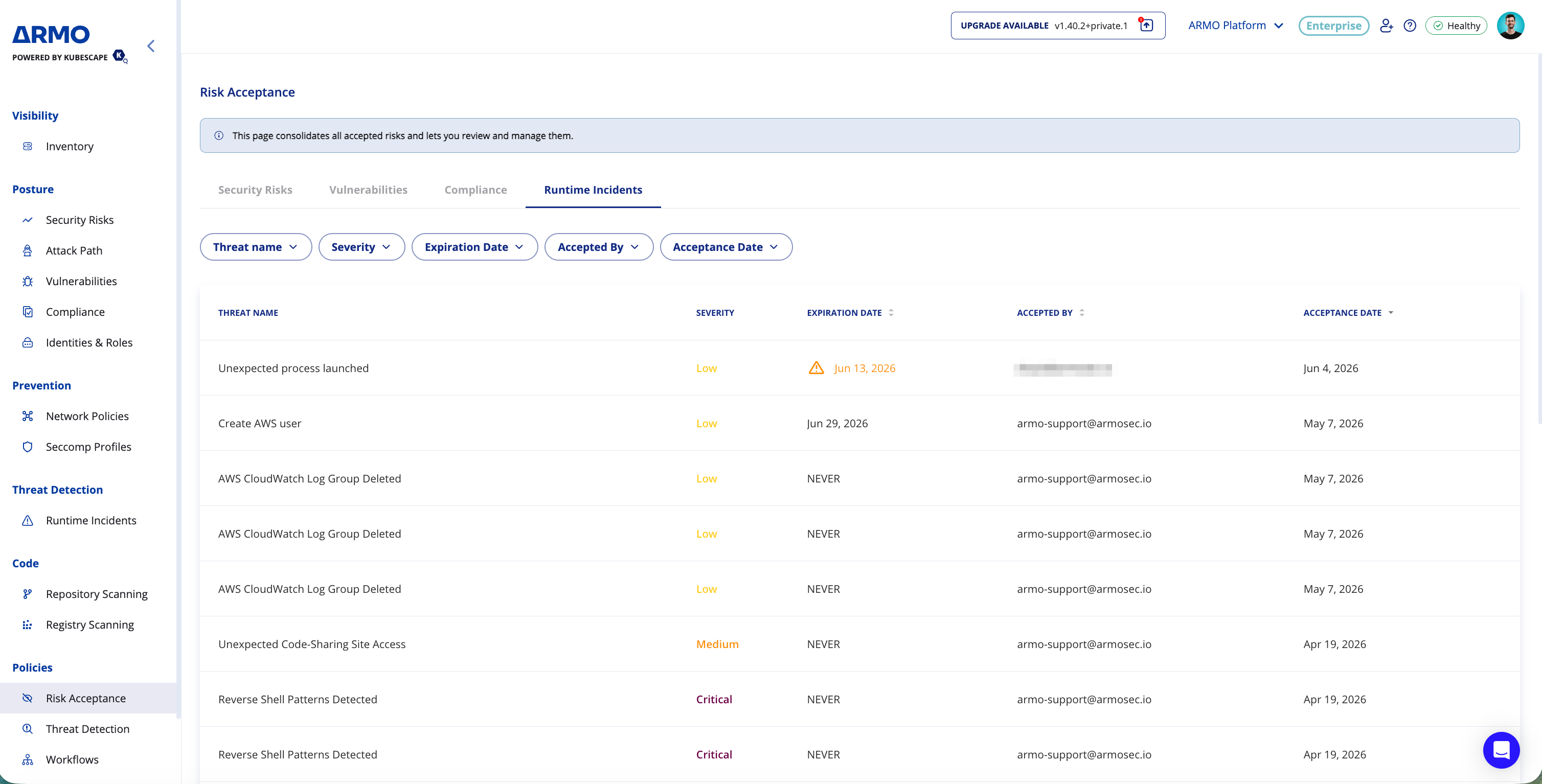
You can manage existing risk acceptance rules from the Risk Acceptance Management section.
From this section, you can review and revoke existing suppression rules when they are no longer needed.
Revoking a rule stops future suppression for incidents that match that rule. Incidents that were previously affected by the rule remain stored in the system and can still be viewed.
FAQs
Q: What happens to existing and future incidents when risk is accepted?
Existing incidents that match the rule criteria are marked as resolved. They remain stored in the system and can still be viewed. Future incidents that match the rule are not generated and therefore are not stored or shown in the platform.
Q: What happens when a risk acceptance rule expires?
When a risk acceptance rule expires, it becomes inactive and no longer suppresses new matching incidents. Existing incidents that were previously marked as resolved remain resolved and are not reopened.
The expired rule remains visible in the Risk acceptance section, where you can review it or extend the expiration date if needed.
Q: What are the differences between ADR and CDR risk acceptance?
They use the same general matching logic, but differ in scope configuration and advanced scope entities. ADR is based on runtime context, while CDR is based on cloud-resource context.
Q: What does Select all and future mean in CDR scope?
For CDR incidents, some scope fields support Select all and future. When selected, the rule applies to all current values for that field and future values added later.
For example, selecting Select all and future for resources allows the rule to apply to matching incidents for current and future resources in the selected context.
Q: Can I manage or revoke a rule later?
You can manage risk acceptance rules from the Risk acceptance section under Policies.
If a rule is no longer needed, you can revoke it. After a rule is revoked, future matching incidents are no longer suppressed.
Updated about 1 hour ago