
Rules
Threat detection rules define what ARMO Platform detects in your runtime and cloud environments. Each rule represents a specific detection logic, such as a known attack pattern, suspicious runtime behavior, or cloud activity that may indicate compromise.
Rules are used by threat detection policies. A rule defines what to detect. A policy defines where the rule is enabled, which environments it applies to, and what happens when the rule triggers.
View rules
To view detection rules:
-
Go to Policies > Threat Detection.
-
Select the Rules tab.
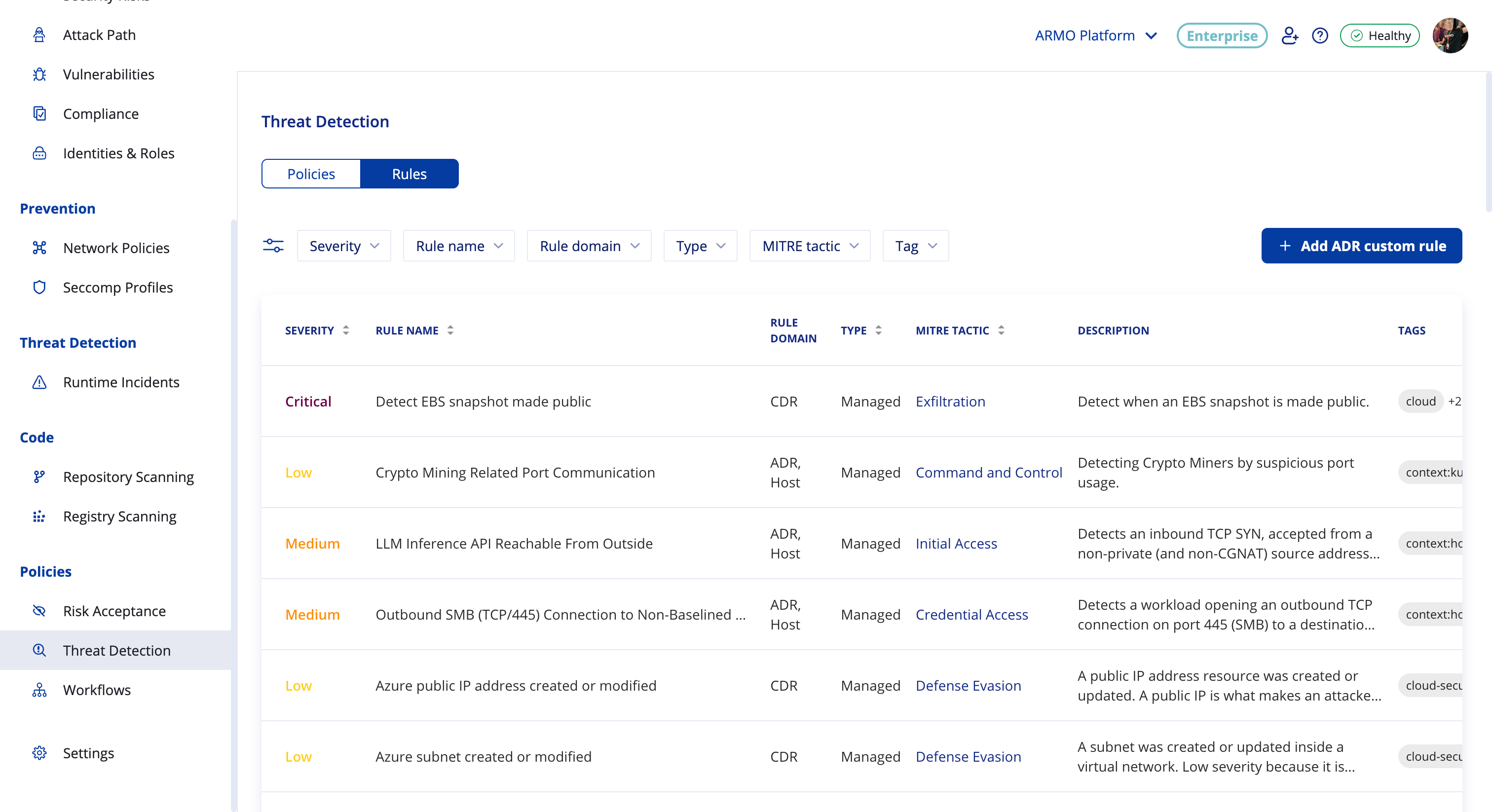
The Rules tab lists all available detection rules, including ARMO-managed rules and any custom rules created in your account.
| Column | Description |
|---|---|
| Severity | The risk level assigned to the rule: Critical, High, Medium, or Low. |
| Rule Name | The name of the detection rule. |
| Rule Domain | The detection domain where the rule applies: ADR, CDR, or both. |
| Type | Indicates whether the rule is Managed by ARMO or Custom. |
| MITRE Tactic | The MITRE ATT&CK tactic associated with the rule, such as Execution, Persistence, or Command and Control. |
| Description | A summary of the activity the rule detects. |
| Tags | Context labels that describe where or how the rule applies, such as context:kubernetes, context:host, or cloud. |
| Last Update | The date the rule was last updated. |
To view more information about a rule, click the see documentation icon at the end of the rule row. This opens the rule details window, which includes the full description, MITRE technique mapping, supported platforms, and detection explanation.
Rule domains
The Rule Domain column shows which detection layer a rule belongs to. Some rules may apply to more than one domain.
| Domain | Description |
|---|---|
| ADR | Application Detection and Response. Detects threats at the application, workload, container, and host level using ARMO runtime sensors. ADR rules can detect suspicious process execution, file access, network activity, system call behavior, and other runtime signals. |
| CDR | Cloud Detection and Response. Detects threats at the cloud infrastructure level by analyzing cloud audit logs, such as AWS CloudTrail, Azure Activity Logs, or GCP Audit Logs. CDR rules can detect suspicious API activity, identity activity, resource changes, and cloud configuration changes. |
Rule types
ARMO Platform supports two rule types: managed rules and custom rules.
Managed rules
Managed rules are created and maintained by ARMO. They provide built-in detection coverage for known attack techniques, suspicious behaviors, and indicators of compromise.
Managed rules are:
- Read-only — you cannot edit managed rule logic.
- Updated by ARMO — ARMO maintains and updates managed rules as detection coverage evolves.
- Available in policies — managed rules can be enabled through ARMO-managed threat detection policies or added to custom threat detection policies.
Managed rules may include a documentation link that opens a public rule reference page.
Custom rules
Custom rules are detection rules created by users in your account to address environment-specific detection needs. They appear alongside managed rules and can be used in threat detection policies.
For more information, see .
Filter and sort rules
Use filters to quickly find relevant detection rules.
| Filter | Description |
|---|---|
| Severity | Show rules with a specific severity level. |
| Rule name | Search for a rule by name. |
| Rule domain | Show rules for a specific detection domain, such as ADR or CDR. |
| Type | Show managed rules, custom rules, or both. |
| MITRE Tactic | Show rules mapped to a specific MITRE ATT&CK tactic. |
| Tag | Show rules with a specific tag, such as context:kubernetes, context:host, or cloud. |
You can apply multiple filters at the same time. You can also sort the rules table by selecting a column header.
Rule details
To open the rule details window, click the see documentation icon at the end of the rule row.
The rule details window opens with additional information about the selected rule, including MITRE mapping, supported platforms, and detection details.
The rule details window may include the following information:
| Field | Description |
|---|---|
| Rule ID | The unique rule identifier. |
| Severity | The severity assigned to the rule. |
| MITRE Tactic | The MITRE ATT&CK tactic associated with the rule. |
| MITRE Technique | The specific MITRE ATT&CK technique associated with the rule. |
| Platforms | The supported platforms or environments for the rule, such as host, Kubernetes, or ECS. |
| Description | A detailed explanation of what the rule detects and why it matters. |
| Attack Technique | Background information about the attack method or behavior the rule is designed to detect. |
| How It Works | A technical summary of the detection logic and signals used by the rule. |
Use the rule details to understand what activity a rule detects before enabling it in a policy or using it as a reference for custom rule creation.
Use rules in threat detection policies
Rules do not run independently. To activate detection logic, rules must be included in a threat detection policy.
A threat detection policy defines:
- Which rules are enabled.
- Which clusters, workloads, namespaces, cloud accounts, or environments the rules apply to.
- Which actions are taken when a detection occurs, such as creating an alert or sending a notification.
ARMO provides managed policies that enable managed detection coverage across your environment. You can also create custom policies to control which managed and custom rules are active and where they apply.
For more information, see Threat Detection Policies.
Updated about 2 hours ago